Back
My Role
Understand user needs across the app flow, define strategies to enhance inclusivity and accessibility, test prototypes, identify challenges, and iterate.
Team
Harshul Narang, PM; Prabhat, Engineer
Duration
Apr 2021-Oct 2021
Overview
Designed Ria, a voice assistant for Avail Finance, to improve accessibility for first-time tech users. By addressing literacy and navigation challenges, the solution enhanced user engagement and flow completion rates.
Impact
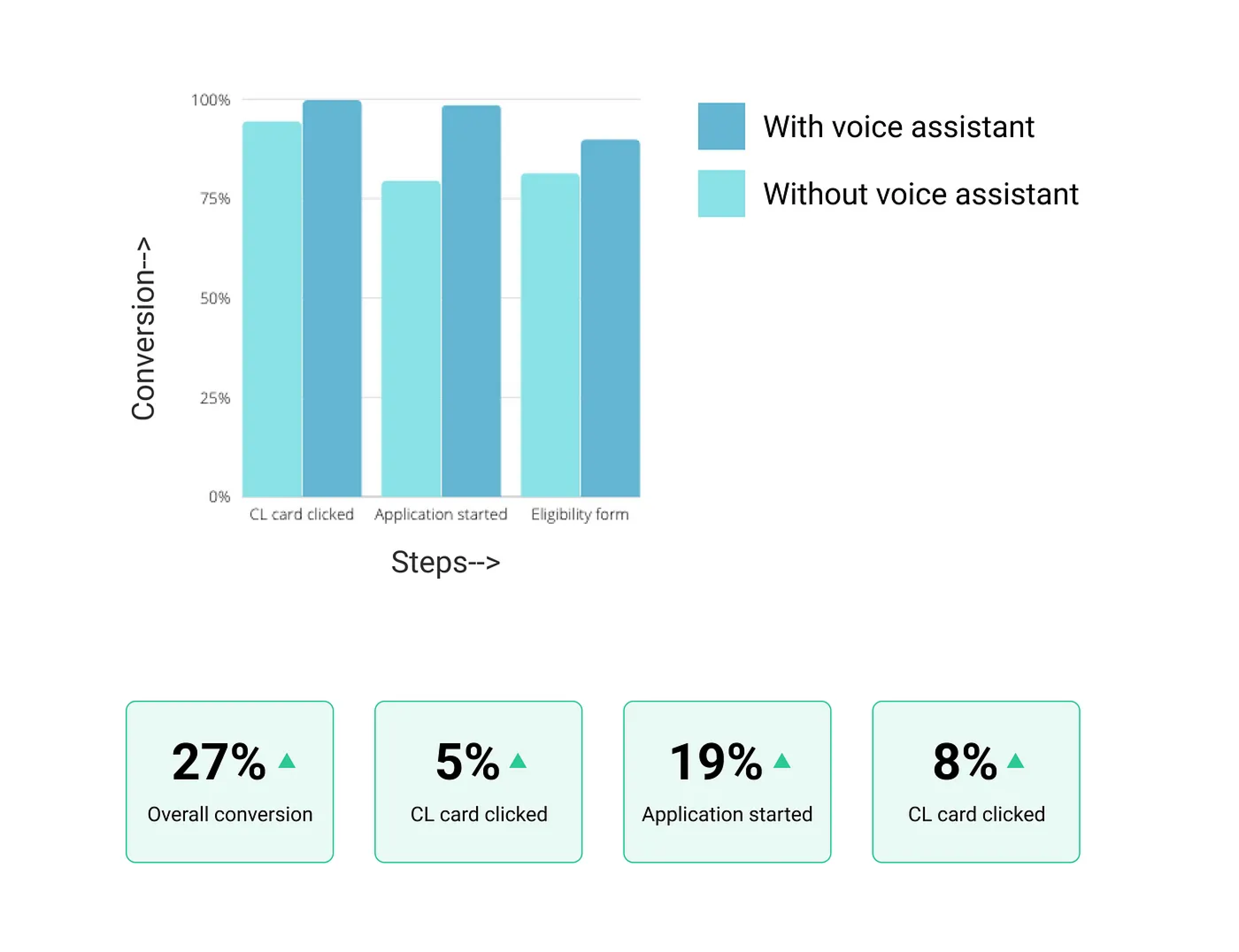
Improved the credit application flow conversions by 27%
Avail & Its users
Avail is a financial care service for the unorganized workforce of India, who are not served by current lending solutions. It’s an app-based lending platform, providing credit and other financial services to the underserved segment of India i.e taxi drivers, delivery boys, security guards, cleaning staff, and many more.
This segment of the population is new to technologies and services and the opportunity space is growing rapidly as more and more of these users also known as the next billion users, are joining the digital platforms due to the rise and easy access to the internet.
How does the app work?
It's a lending app where the user can apply for credit with minimal documentation processed online through the app with hassle-free credit disbursal directly into their bank account.
Sounds simple right?
It may sound simple to us but for these users who are new to technology, it becomes quite difficult to use the apps with traditional UI guidelines, and thus it's hard for them to complete the application process which made us realize the need of enhancing accessibility for these users and include all such users into the digital world
The Problem
To understand the problem better, I talked to these users while doing user testing for different flows in our app and also observed how they used our app. This helped me define certain pain points that users have with respect to using the app-
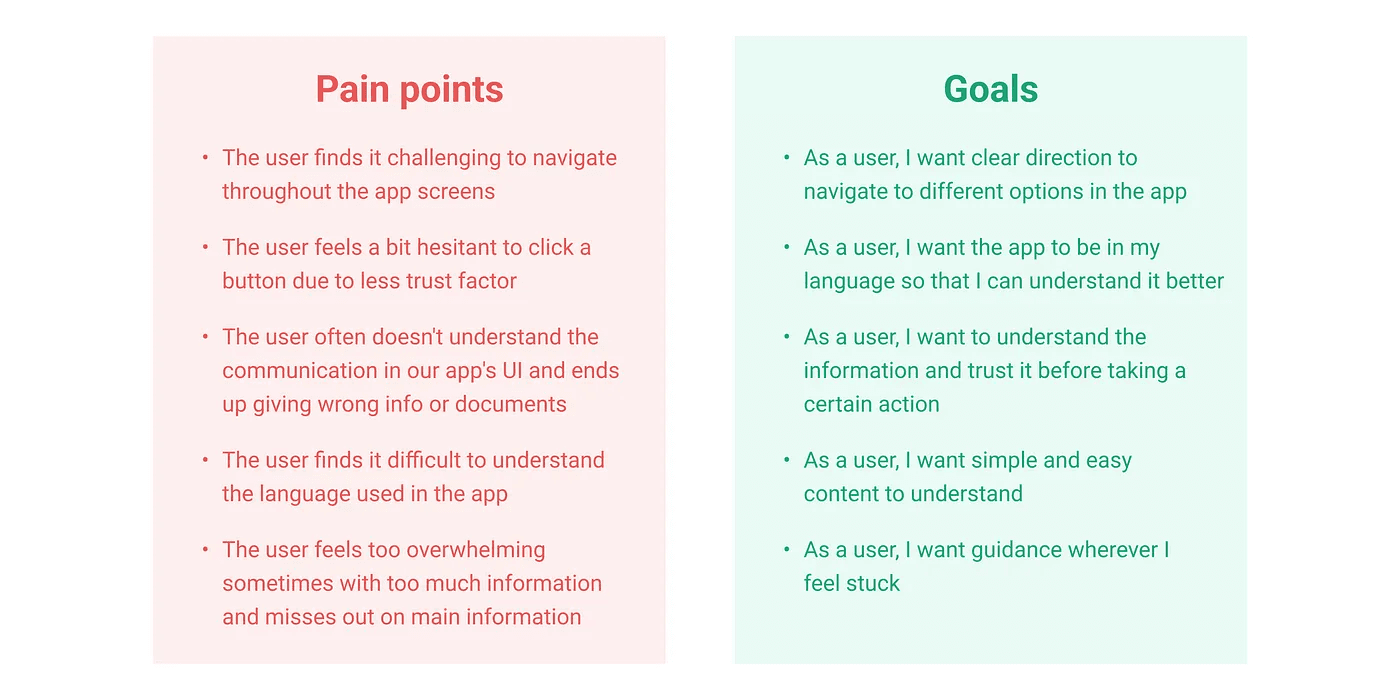
“ The problem is the inexperience of these users to use the modern devices and graphical interfaces. They find it challenging to navigate through the app and feel difficulty in understanding the information correctly ”
What others are doing?
To understand what methods we can inculcate to solve these pain points, I did some secondary research to understand what others are doing to make their platform more inclusive and accessible-
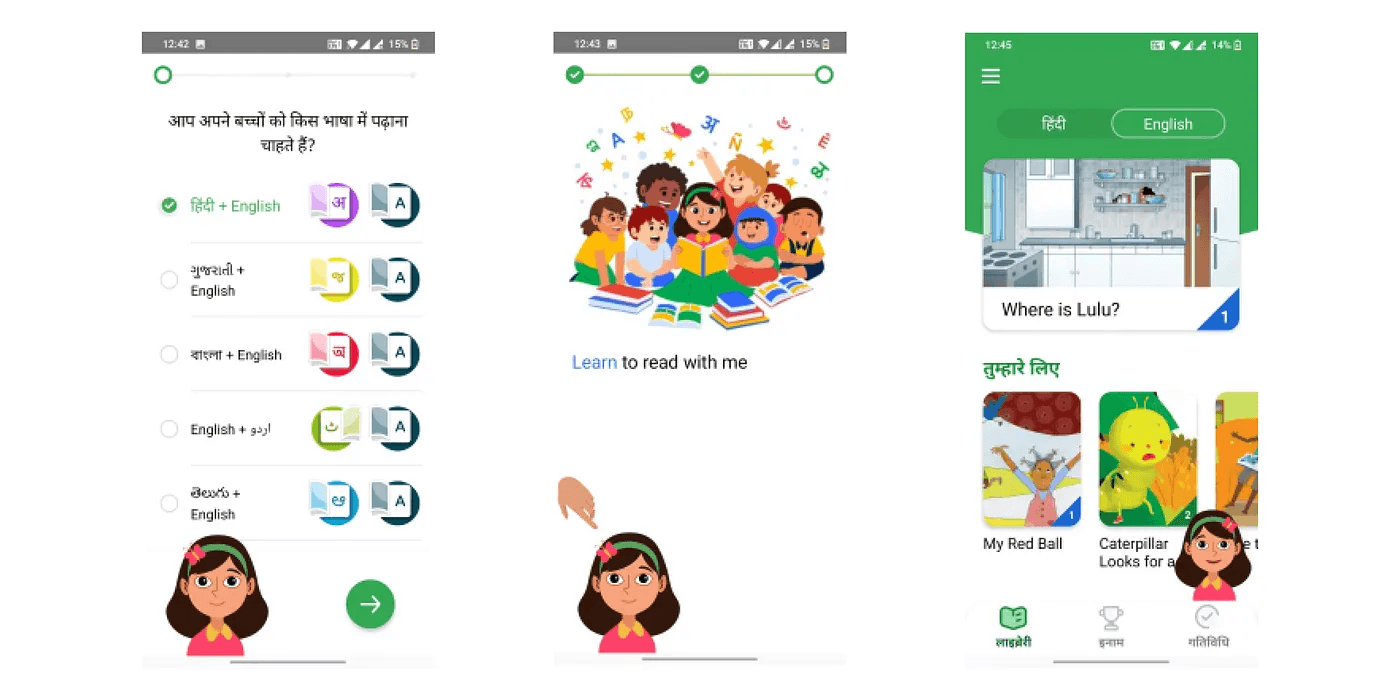
Voice assistance with micro-animations
In google bolo, the voice character helped kids read and learn in an easy engaging way. The kids could relate to the character and feel like a human friend is helping them
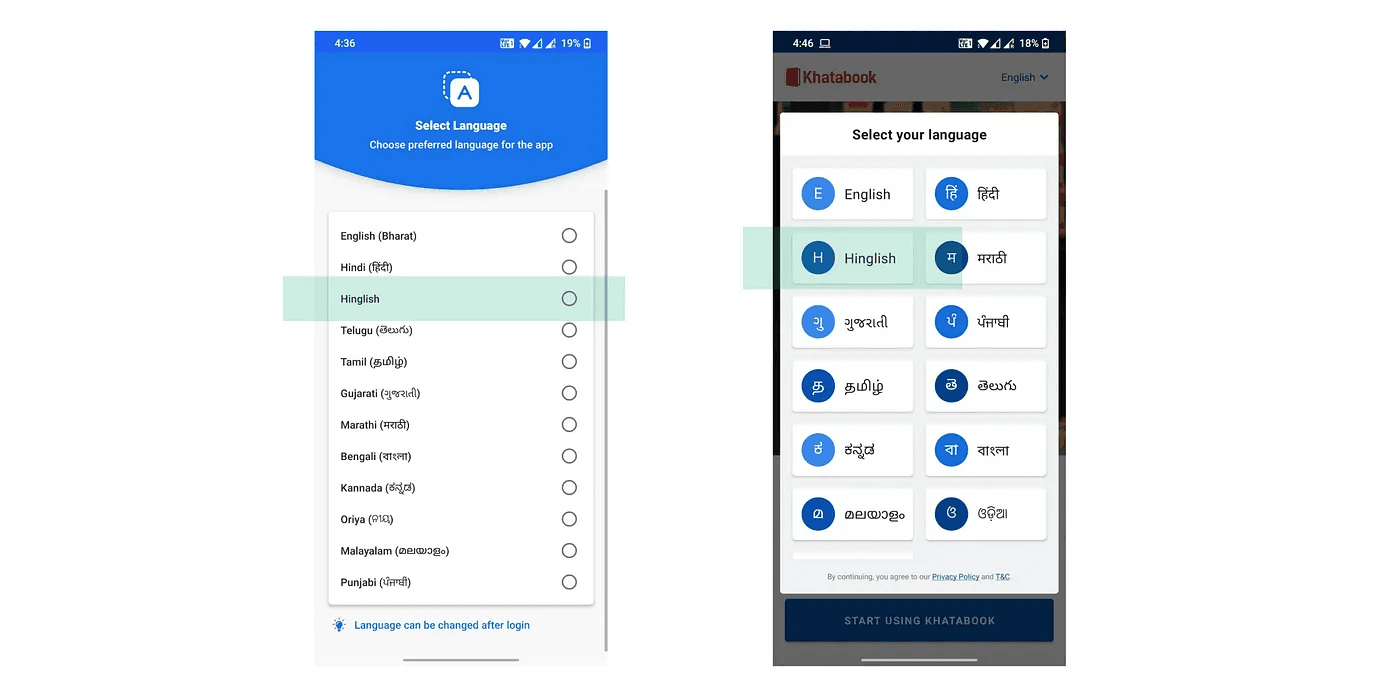
2. Vernacular app with Hinglish language
Since India is a diverse country with many languages, many apps are trying to build their flows in different vernacular languages to make communication easy
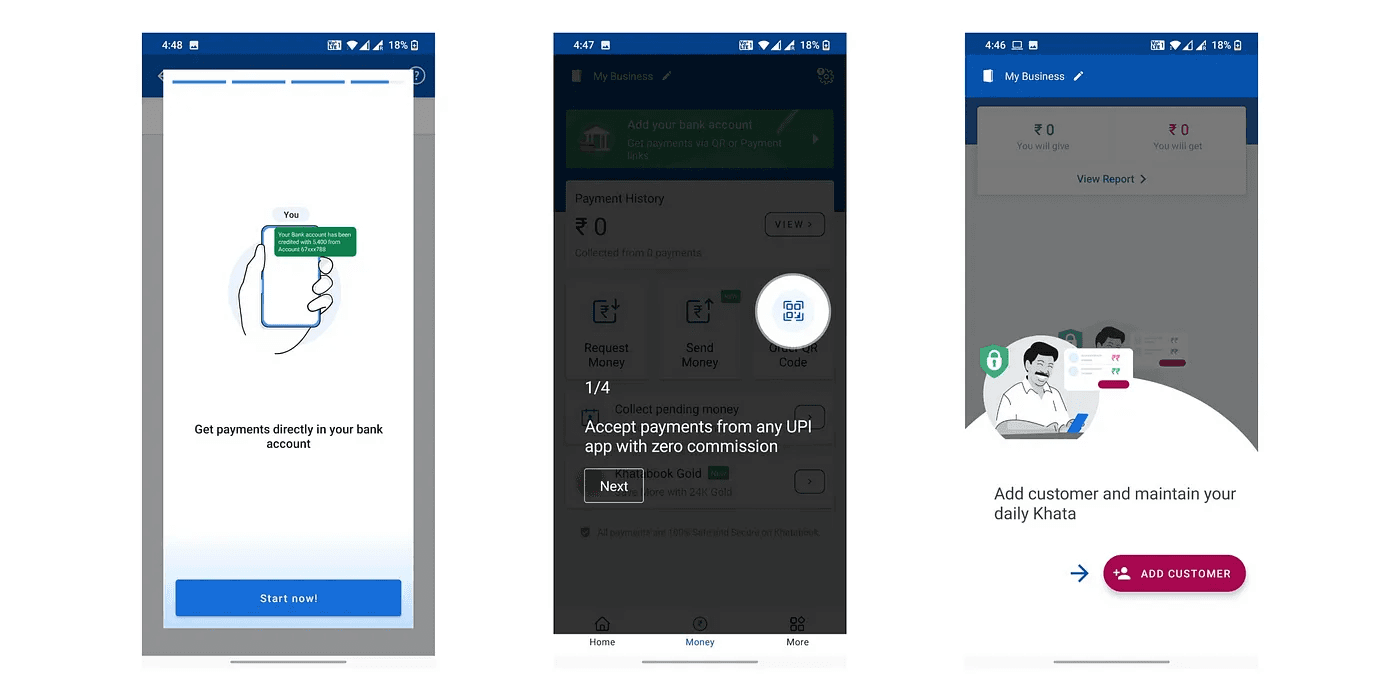
3. Tutorials using stories, videos, and coach marks
Videos help communication simple as its easier to understand the information compared to reading textual content
4. Voice input
Many users new to technology are not good at typing in English, but typing in their native language is even more difficult. Youtube, Flipkart, Myjio, etc. are leveraging voice input to make the search easier for the users
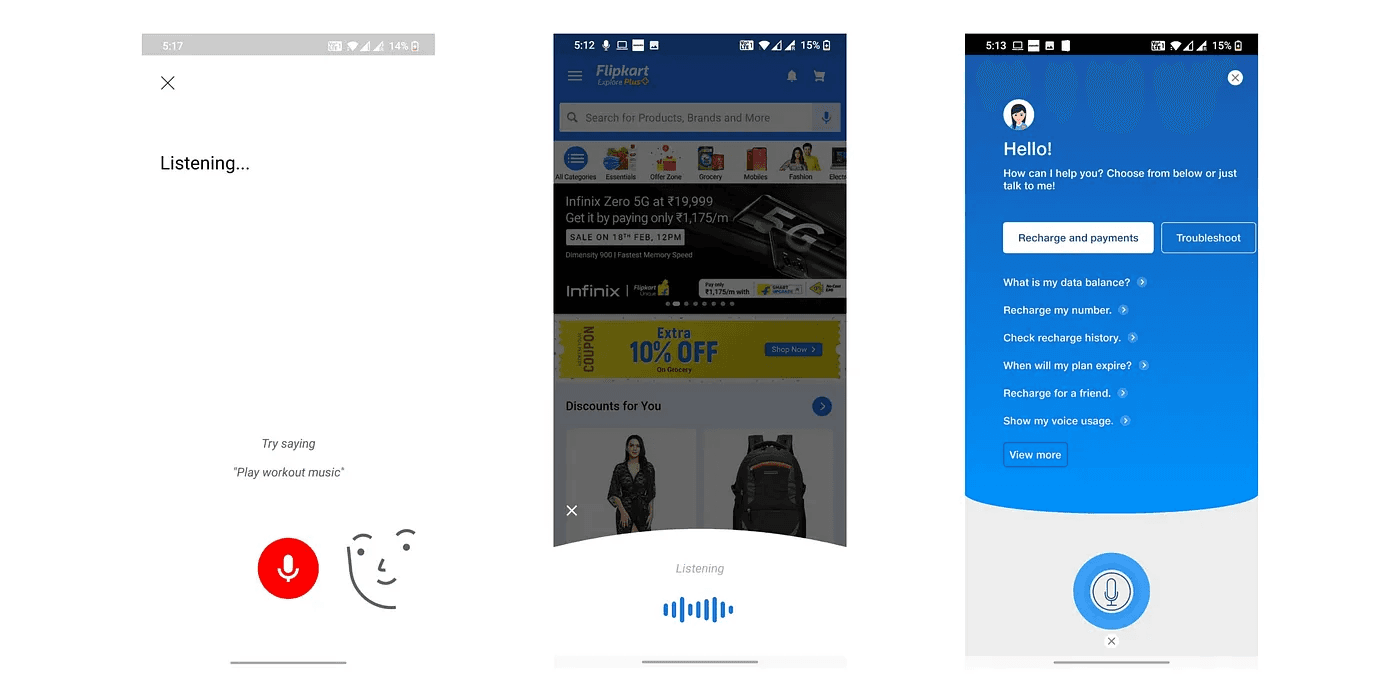
After doing this secondary research, I had a clear idea of methods we can use to improve accessibility. But to identify the best method for us, I defined use cases for the flows that we have.
Methods and their use cases for Avail
Voice assistant
Use case- User face problem while reading and understanding the information, voice assistant will help users understand the relevant information required to take the certain action
Microinteractions and hand gestures
Use case- With different UI elements on the screen, taking a certain action becomes confusing for the user, this subtle microinteraction and gestures will guide user in taking the action
Voice input
Use case- Typing is not that easy for users, Voice input will help users fill their details in long forms in the application process.
Vernacular languages along with Hinglish
Use case- Users will be able to understand the communication better in their native languages and the current habits observed from the users suggest that people find easier to cummunicate in a combination of Hindi+English
Tutorials using stories, videos, etc
Use case- User understands better with videos compared to textual UI. This will help us present information in an engaging way for the users. We can use this to introduce /educate users about a certain product,element or navigation pattern.
I presented the pain points, methods to solve them, and their use cases to the stakeholders and my teammates. Based on the use cases and projected impacts-
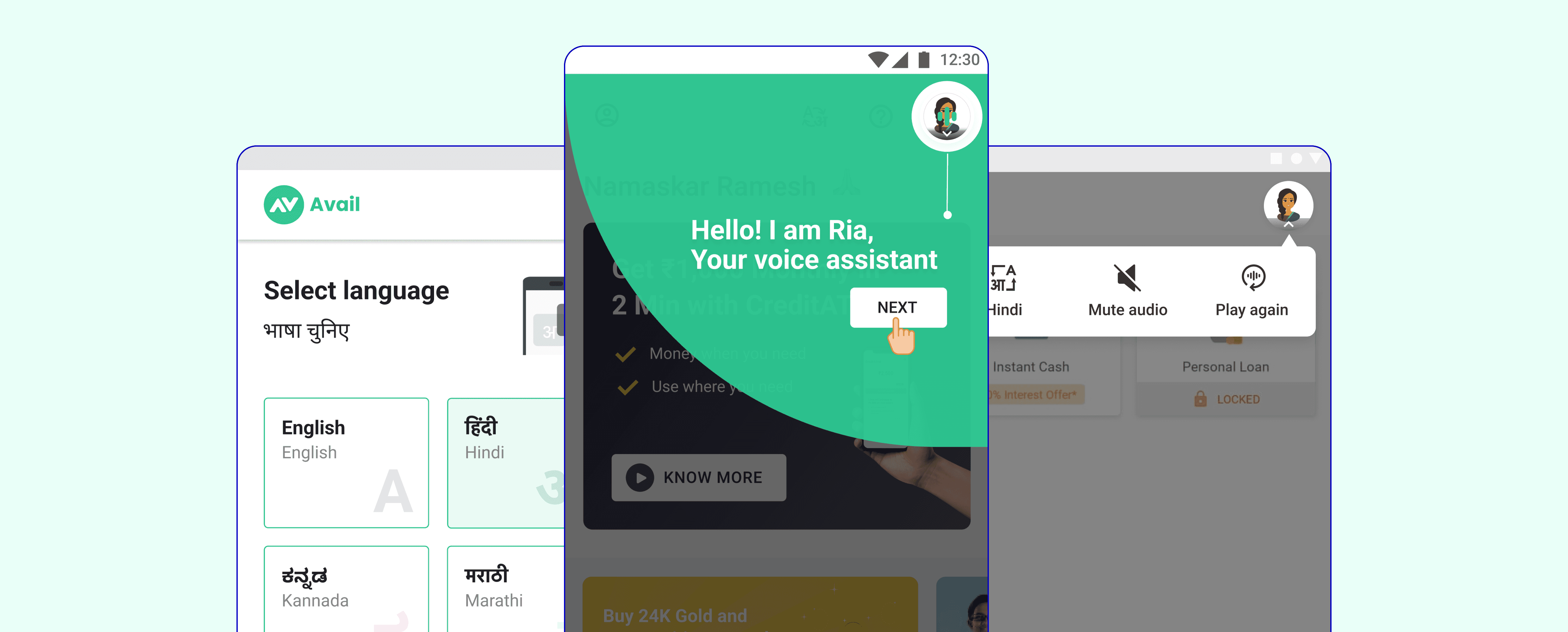
We decided to design a voice assistant along with gestures that solve the problem of information understanding( as listening is easier than reading) along with the gestures which help users navigate throughout the flow. Other methods such as voice input, tutorials, and language could be taken up in the future roadmap.
Designing Ria- the voice assistant
The framework can be implemented anywhere in the app flow
To start with we decided to go with the Hindi language(as 80% of our user base were Hindi speaking) and then scale it to other languages basis how it performs.
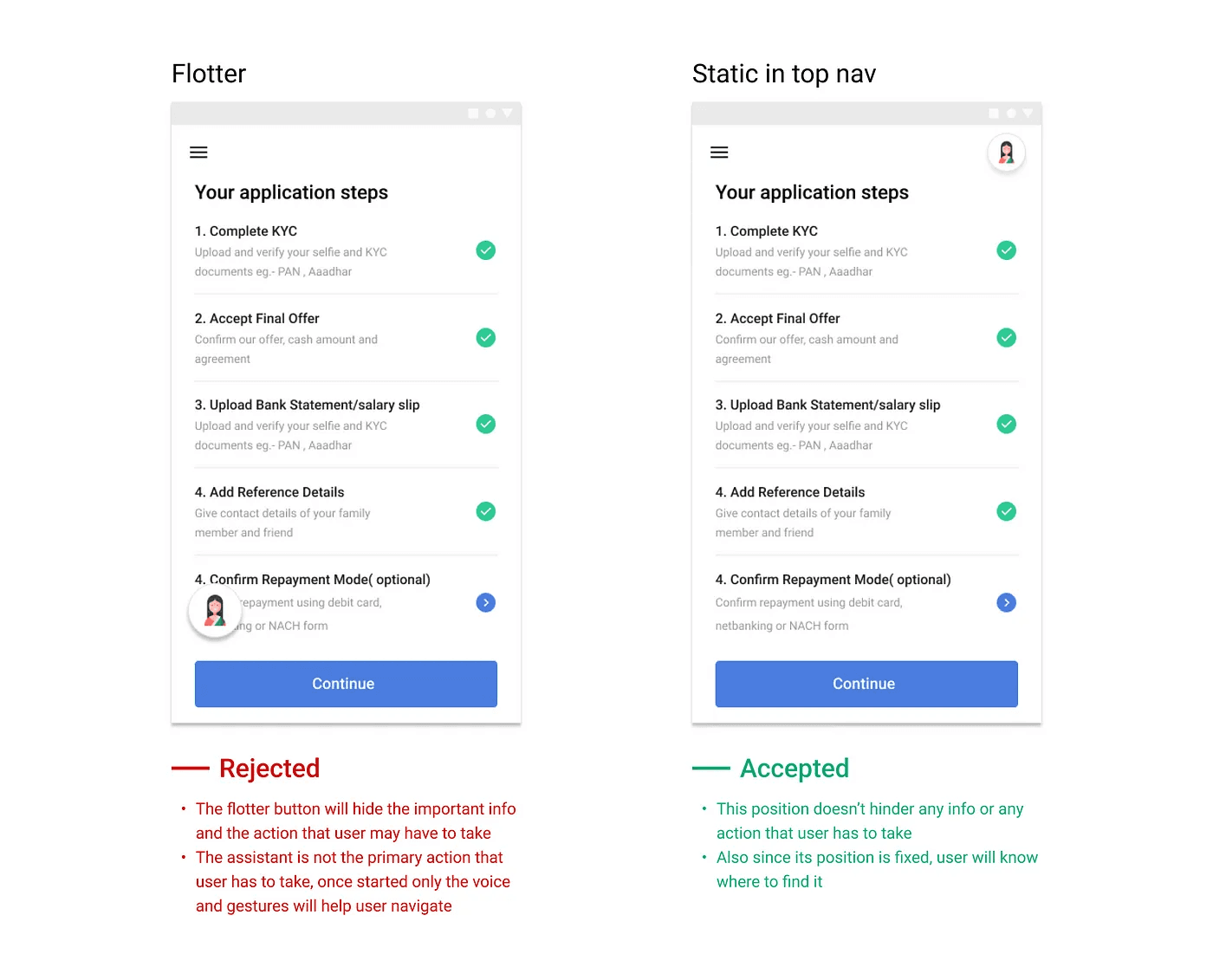
Position of Voice assistance-
Out of the two iterations for the position of assistant, I decided to go with the static position because it doesn't hinder the info or any user action
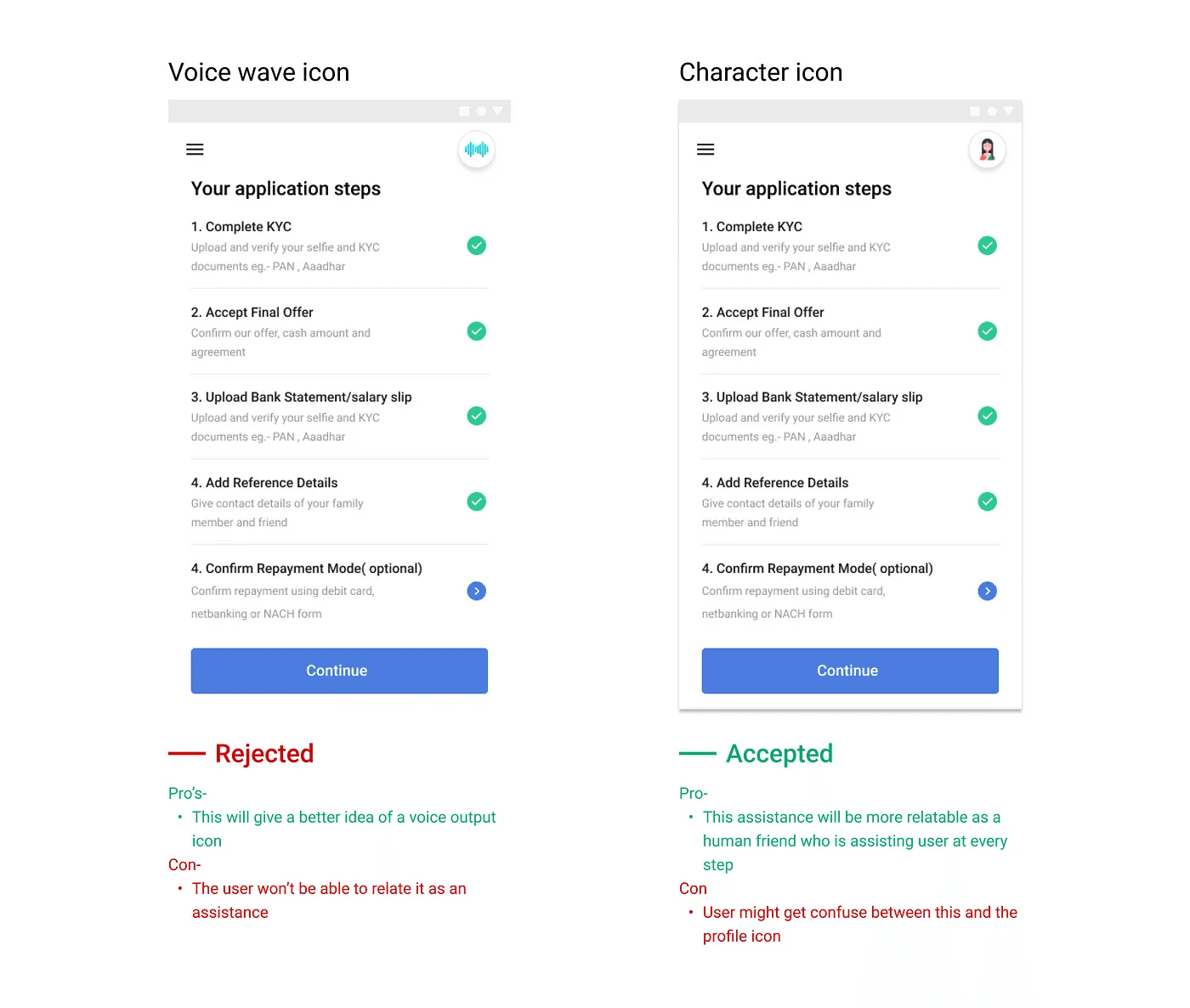
Icon for the voice assistance
The character icon makes the assistant more relatable as a human friend helping the user at every stage. This will help the user associate with the assistant more
Voice scripts framework
This was the most important part of the process as this ensures consistency in the way the assistant communicates with the user and makes them understand the information correctly, guiding them to take the action, and providing them feedback.
The user goes through multiple emotions in a journey. And the assistant should be able to communicate basis the emotion user is having at that moment. So I defined six emotions that the user might have and the voice script will be written according to that situation
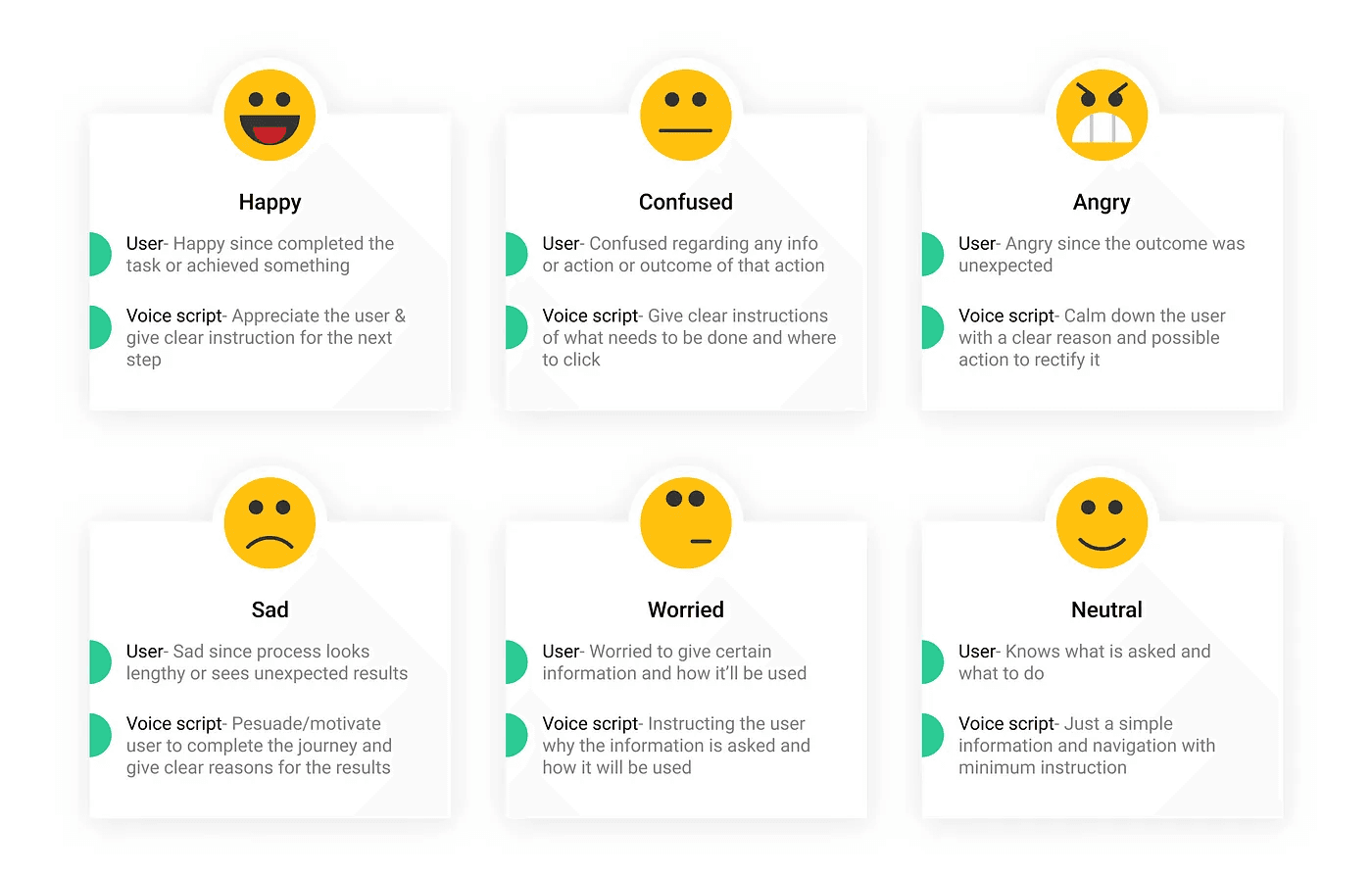
Few examples-
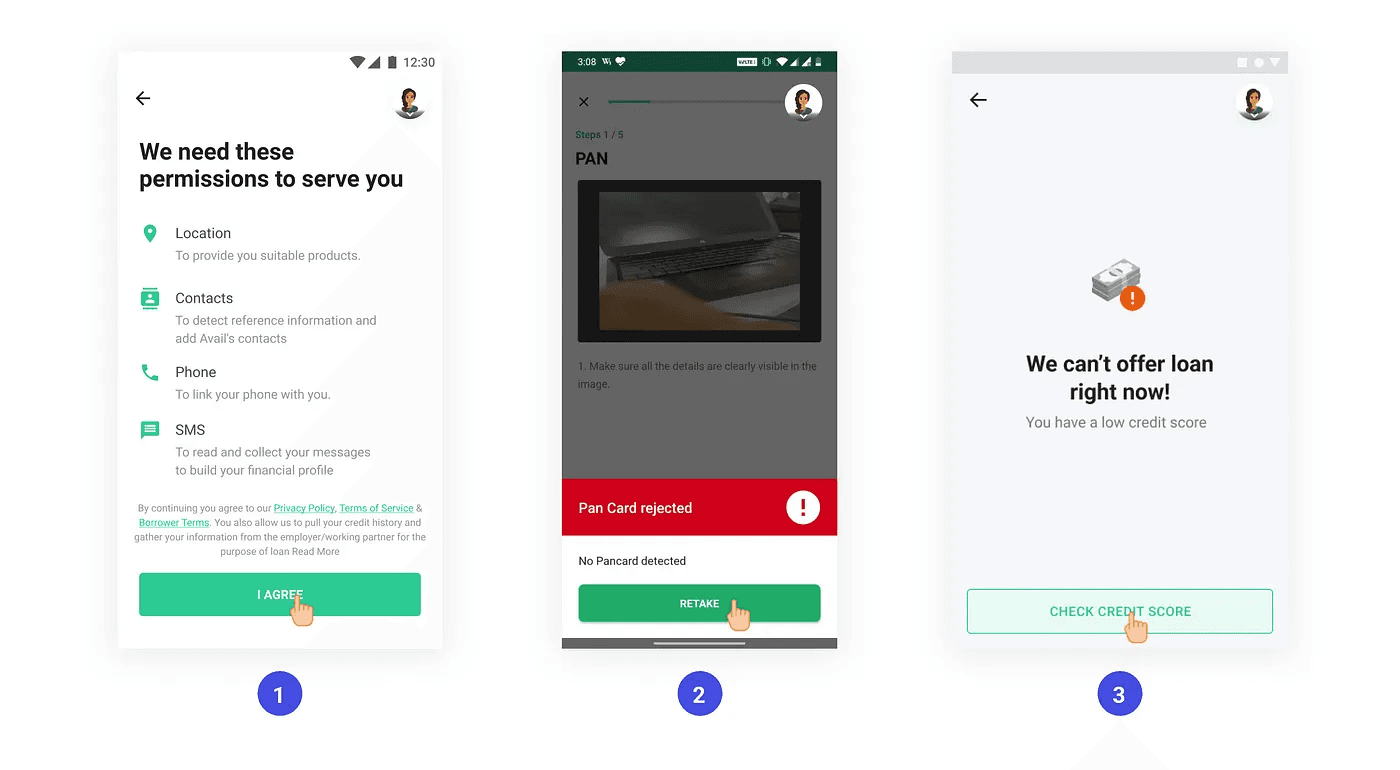
1. Worried since his personal information is being asked
Voice script- “Humein apaki behatar seva karne ke lie ye jaankari chahiye, I agree par click karke aage badhein”
2. Angry/confused since the uploaded pan card got rejected.
Voice script- “Hum aapke PAN card ka pata nahi laga paa rahe hai, retake par click karke firse upload karein”
3. Sad since loan application got rejected
Voice script- “Maaf kijiye! Aapka credit score kam hone ki wajah se hum abhi aapko loan nahi de paayenge, aapka credit score check karne ke liye yahan click karein”
Prototyping
We needed to validate our hypothesis that the voice assistant we create increases accessibility and helps the user navigate and understand the information correctly. For that, I created a working prototype to test it out with a few users
So, to start with I picked up a flow where the user has to complete his KYC in the application process. These steps involved a high drop off and the user faced a problem in completing the flow.
Which tool should I use to build the prototype?
Figma- My screens were designed in Figma, but it didn’t provide voice prototyping capability
Adobe XD- It provided voice prototyping with the auto animate feature, but I cannot control both hand gestures and voice simultaneously here
After exploring a few options, I used Protopie as the prototyping tool as it provided both capabilities
Here is the prototype video-
User testing
To test this feature with users I created a testing plan and wrote down a few points that I wanted to test out. Here is the testing plan
Insights-
I tested it with 11 users, including drivers, staff members, and security guards-
9/11 users were able to complete the flow without any help. 1 user didn’t speak Hindi so wanted it to be in the English/Kannada language. And the other user got stuck with the Aadhar verification screen as his Aadhar number was not linked, said he will upload driving license
9/11 users listened to the audio completely before clicking, 1 user has already used Avail so he knew what he was doing and wanted to disable the audio
Few users wanted to listen to the audio again but couldn’t find an option to do so. Although 1–2 users went to the previous screen and came back to play the audio again
All users were clicking on the hand gestures, and their navigation became easy and fast
All users found voice assistants very helpful. One user even called his friend during field testing saying “Dekho Kitna easy banaaya hai”
On the Aadhar verification screen, many users clicked on the first option as it was blinking & the audio paused for a second, although it was not the method they wanted to select. ( this created a bias in selection between two choices)
In the field test, where I tested with security guards due to background noise they were not able to hear it properly and wanted to increase the volume. To solve that they kept the phone near to their ear to listen to it.
Autoplaying the audio worked well, as our users were able to connect with the icon interaction and incoming voice
Actions:
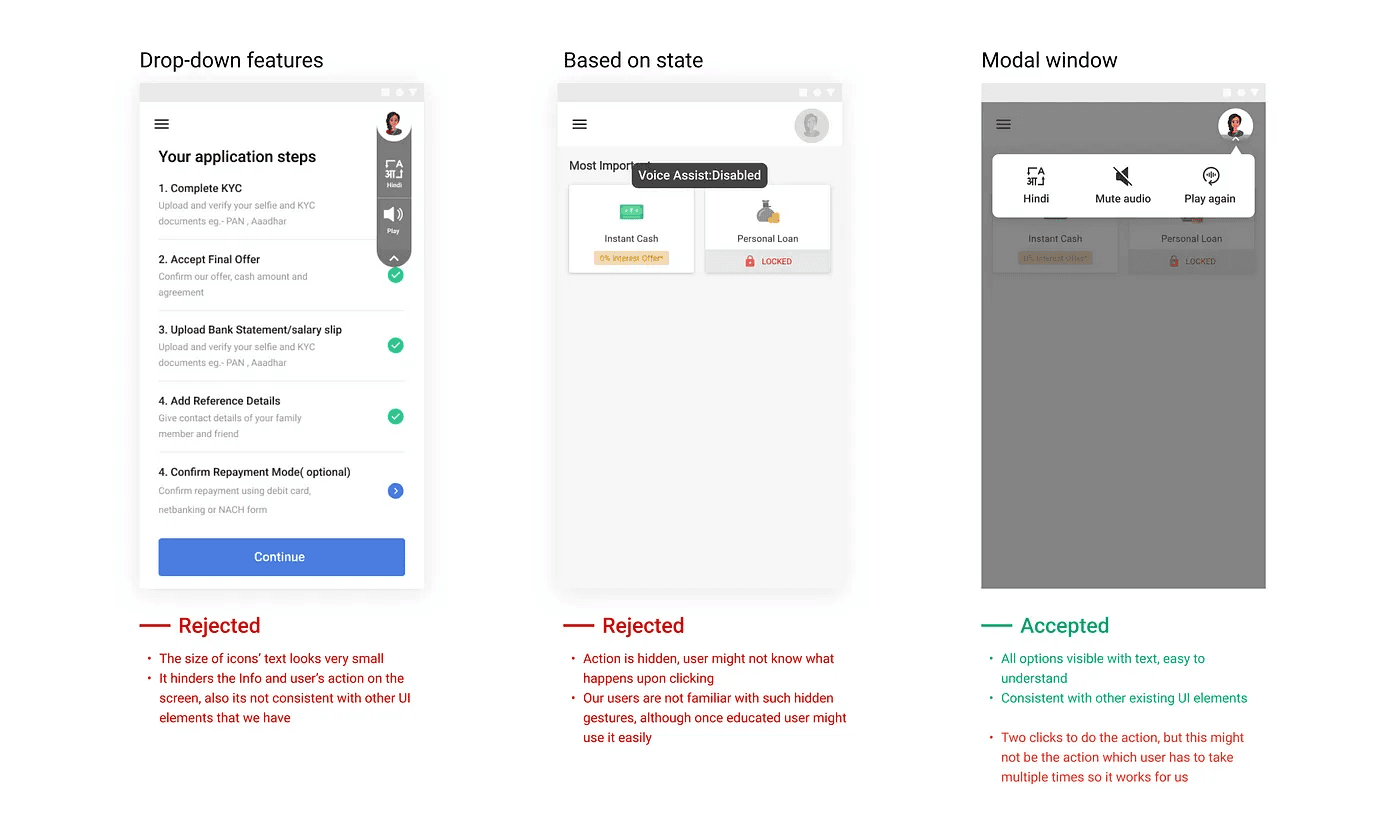
We need to add a few features to the audio assistance such as playing again, disabling, and changing language(when we add multiple languages)
Do not add any gestures/micro animations when the user has to select from multiple options, it creates bias
Try to write the voice scripts short and precise, since the user might not remember the audio
The voice sounds robotic, and it can change the context of the statement. Thus we need to make it recorded by a human voice artist for a high-quality voice
Adding features to the voice assistance
Based on the insights from the user testing, a few features that users wanted were playing the audio again, disabling the audio if they don’t want it, and changing the language. These features were also tested with users and the third one came out to be the most convenient one
Implementation and impact
This feature was not picked up instantly by the developers, as it required high effort to build it in-house so it was kept on hold. But then with the help of third-party integration, we were able to launch it. We picked up a flow, wrote the scripts again, and launched it with only the Hindi language only in northern states where people speak Hindi. We did A/B testing and here are the results-
Next steps
To analyze how users are using this feature and improve on it
To introduce more languages and launch them in other locations as well
Currently, it works with a single action on a single screen, need to figure out ways to make it work for multiple actions that users can take
Challenges faced
Creating the prototype was a challenge as I had to learn a new prototyping tool
With changing flows and UI, every time we’ll have to change the scripts
Voice recording is a challenge, as translating it through software will not make it feel human and human recording will take time and cost
Finding users for testing was a challenge, also I had to go out in the field to find users and convince them to test the prototype
Conclusion
Many new internet users struggle with lower literacy and depend on voice to interact with technology. This will empower many users to do things themselves, without the assistance of others, increasing confidence while exploring digital products.It was a very challenging project for me as I have never worked with voice before. I learned many new things along my process and it felt really good when I saw the impact that voice can create.